
CharlesWorks Exposes the Fake Audits and Website SEO Spam Emails and Scams in Your Junk Folder

by | Jul 1, 2026 | Phishing, Scams and Spoofs, Search Engine Optimization (SEO), Spam, Technical Help

Sorting Email in FoldersWebsite seo spam emails happen every single day. You open your inbox, and there it is: a vague, slightly ominous email claiming someone “checked your website” and found errors, bugs, or “opportunities to improve online visibility.”

For those of us who have been managing websites for decades—since we founded CharlesWorks back on June 15, 1998—these messages are a laughable joke. But for many small business owners, they cause genuine panic. You might wonder, “Is there really something wrong with my website? Am I losing customers?”

Let’s pull back the curtain on these digital con artists, dissect a real-world example, and show you exactly why you should hit “Delete” without a second thought.


Anatomy of a Website SEO Scam Email

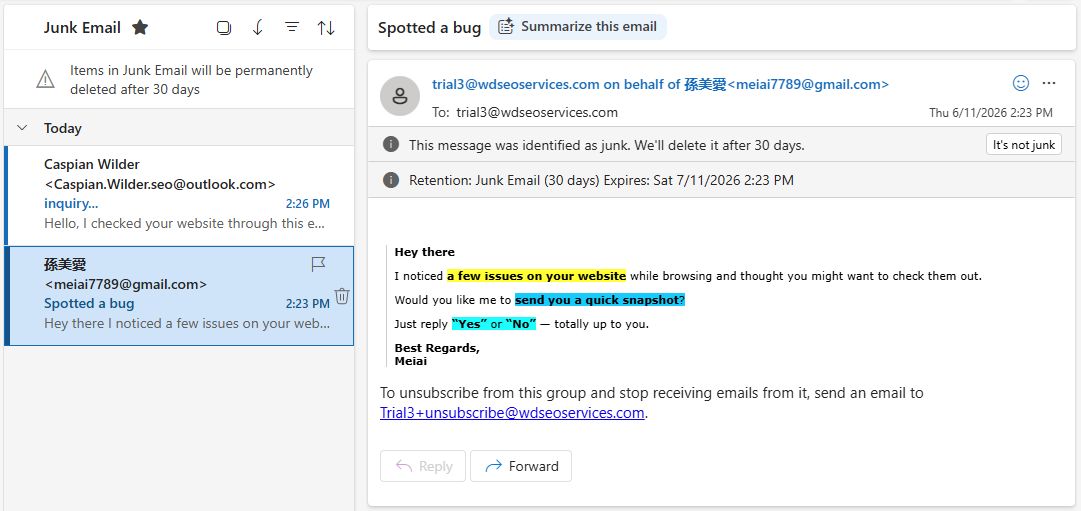
Take a look at the image below. This is a textbook example of the cold-email spam that floods inboxes daily. At first glance, it might look like a legitimate business inquiry, but when you know what to look for, it falls apart instantly.
A few issues on your website: website seo spam emails

The Blatant Red Flags Discovered in This Email

  • The “To” and “From” Match: Look closely at the header. The email is sent from Caspian.Wilder.seo@outlook.com and is addressed to Caspian.Wilder.seo@outlook.com. This is a classic spammer tactic. They use Bcc (Blind Carbon Copy) to blast the exact same message to thousands of website owners at once, making it look like a personalized note when it is anything but.
  • Free Email Addresses: Any legitimate tech agency or SEO expert will have their own branded domain (e.g., name@companyname.com). They will not be pitching professional corporate services from a free, generic @outlook.com or @gmail.com account.
  • Total Lack of Specifics: Notice how the email says, “I checked your website.” Which website? They don’t mention your domain name, your company name, or a single specific issue. It’s a generic template designed to fit every website on Earth.
  • The Fake Identity: The sender signs off as “Tech TeaM” (complete with bizarre capitalization). No legitimate company operates under a name that vague. Furthermore, looking at the inbox sidebar, you can see another spam email sent just three minutes prior from a completely different name using the exact same generic “Spotted a bug” template.

What Is Their Actual Angle? (Spoiler: It’s Your Credit Card)

You might wonder what these scammers actually gain by asking a simple question like, “Should I send you Inquiry & Cost?”

This is the hook. They are fishing for “marks”—susceptible targets who reply out of fear or curiosity. If you reply, here is what typically happens next:

The Fake Audit: They will send you a automated, generic “SEO report” generated by a free tool. It will highlight terrifying red flags that are actually completely normal website behaviors or minor, irrelevant data points.

Once they have convinced you that your website is in jeopardy, they will demand upfront payment to “fix” it. In the worst-case scenarios, these operations are entirely fraudulent. They don’t want to optimize your metadata; they want your credit card number. Once they have your payment details, they may hit your card with unauthorized charges, sell your data on the dark web, or lock you into recurring monthly fees for services they never perform.


Trust Experience Over Inbox Fear Tactics

Scams like these are infuriating because they erode the trust that honest, long-standing internet professionals work so hard to build. When an AI or an automated script blasts out fear-mongering lies, it makes business owners defensive and skeptical of legitimate help.

For 28 years, CharlesWorks has stood for transparency, reliability, and real human support. If there is ever a legitimate issue with your website’s visibility, security, or performance, a real expert will proactively reach out to you with specific data, clear explanations, and a proven track record to back it up.

The Golden Rule: If an automated email lands in your junk folder from a free email address, telling you your website has invisible problems without naming your site—trust your gut. Your website is fine. Hit delete, and go about your day.


CLICK HERE to find your domain name!   CLICK HERE to transfer your domain name!

Archives

Tags

24 hour (1) Accessibility (2) Accounting (1) Advertising (20) AdWare (1) Alex Johnson (2) Alignment (1) Android (2) Anti-Virus (1) Antivirus (1) Antrim Computer Repair and Service (3) APC Back-UPS (1) Appearance (2) Apple Mail (4) Apple Mobile Mail (2) Attachments (1) Audit (1) Authorized (1) Autoresponder (5) Availability (1) Backups (1) Badges (3) Bank Account (1) Bank Statement (1) Battery Backup (2) Better Business Bureau (3) Bob Hill (1) Bookkeeper (1) Branding (14) Budget (2) Business (34) Business Management (1) Catalog (1) Categories (1) Charles Oropallo (1) CharlesWorks (43) Cherryl Jensen (1) Chrome (1) CleanTalk (1) Cloud (1) Code (2) Communicating (1) Competition (1) Computer (2) Computer Cache (1) Computer Hardware (1) Computer Security (2) Constant Contact (1) Consultation (1) Contact Information (2) Content (1) Content Management (41) Content Management System (1) Copiers (1) Copy Machine (1) Coronavirus (2) Courteous (1) COVID-19 (3) Credibility (11) Credit Card (1) Credit Card Processing (1) CSS (9) Customer Service (2) Database (1) Debian (1) Design (52) Design Expertise (1) Desktop (1) Dialup (1) DirectAdmin (4) Directions (1) DIVI (7) DNS (2) Do-it-Yourself (1) Documentation (1) Domain Expiration (1) Domains (24) Domain Transfers (5) E-Commerce (1) ecommerce (1) Elementor (1) Email (74) Email Lists (5) Email Management (6) Email marketing (4) Etiquette (3) Eudora 6 (1) Exchange (1) Expanding (1) Expiring Domains (1) Facebook (2) Financial (1) Finish (1) Firefox (1) Fonts (1) Forms (2) Forms Protection (1) Fraud (2) Galaxy S4 (1) General Info (1) Gmail (1) GoDaddy (1) Google (1) Google Adwords Certified Partner (1) Google Chrome (2) Groups (1) Happy Holidays (1) Hardware Help (1) Hill Specialty Networks (1) Hosting (1) Images (1) IMAP (1) include (1) Infected (1) Information (38) insert pages (1) Internet Browsing Errors (1) Internet Consultant (1) Internet Explorer (1) Joomla! (1) Keywords (2) Laptop (1) Legibility (1) Linux (14) Logging on (1) Macintosh (1) Mail 6.0 (1) Mail 2011 (2) Make-Over (1) Malicious (1) Malware (1) Marketing (11) Matt Burke (3) MDaemon (3) MelbourneIT (2) menu (1) Merchant (1) meta (1) Microsoft (1) Microsoft Edge (1) Microsoft Hosted Exchange (5) Microsoft Live (2) Mobile Email Setup (1) Monadnock Region (1) Mozilla Firefox (2) MySQL (1) Nathan Wesley (1) Netscape (1) Netscape Messenger (1) Office Copiers (1) OfficeLive (1) Online (1) Outlook (10) Outlook 2010 (2) Outlook Express (1) PayPal (1) Pay Per Click (2) PC (1) Personal (1) Peter Harris (1) Peter Harris Creative (1) Phishing (2) PHP (3) pixel (1) plugins (1) Pop Email (1) Popularity (1) Portfolio (1) Power Grid Failure (1) PPC (1) Prevent Fraud (1) Privacy (1) Private (1) Product (6) products (1) Professional (6) Projects (2) Protect (1) Protection (1) QR codes (1) Quality (2) QuickBooks (1) Reconciliation (1) Reduce Risk (1) Register (1) Reliability (2) Renew (1) Reseller (2) Resolution (1) Restrict User Access (1) Results (1) Review (2) Risk (1) Robin Snow (1) Roundcube (1) Safe (1) Samsung (2) Scam (27) Scammer (26) Search (1) Search and Replace (1) Search Engine Optimization (SEO) (23) Security (35) Security Risk (1) Selling (1) Servers (2) Service (11) Shopping Cart (1) Site (1) SmarterMail (9) Social Engineering (1) Social Networking (1) Software (1) solar flares (1) Solutions for Today (1) Spam (1) Spam Filtering (18) Spammer (1) Spyware (2) SquirrelMail (1) SSL (9) Statistics (2) Stats (2) Stone Pond Technology (1) Storage (1) Support (1) Tablet (1) Target Market (1) Technical Help (1) Testimonials (11) The CW Corner (1) Thom Little (1) Thom Little Associates (1) Thunderbird (3) Thunderbird 10 (2) TLD (1) Topic (1) Top Level Domains (3) Transaction (2) Transfer Data (1) Transfer Funds (1) Typography (1) Update (2) Uploading (1) UPS System (2) Up to Date (1) Virtualmin (1) Virus (2) Viruses (1) Vista (1) Web (1) Web-Over (1) Web Development (112) Web Hoster (1) Web Hosting (2) Web Hosting Company (1) Webmail (8) Web Mail (1) Webmaster (10) Webmin (1) Web Presence (30) Website (121) Website Development (1) websites (2) Web Stats (1) Web terms (1) Web Writing (1) Windows 7 (2) Windows Mail (6) Windows XP (1) WooCommerce (7) WordPress (94) WordPress Updates (1) Working Remote (2) Writing (1) YouTube (1)

Protected by Security by CleanTalk and CleanTalk Anti-Spam