
 603-924-9867
Another Amazing Website Expert Appears
 I receive messages like this constantly. Some of these website audit scam emails crack me up. Yet so many people fall prey to them! It is infuriating and destroys people’s faith and trust in those of us, like me, who have been in business dealing with websites 28 years since starting CharlesWorks on June 15, 1998!
Someone claims they inspected my website and found serious problems. However, they never mention a single actual problem.
They offer to send an “inquiry and cost.” Apparently, grammar costs extra.
These messages sometimes make me laugh. Still, the damage behind them is not funny.
Twenty-Eight Years of Building Trust
I started CharlesWorks on June 15, 1998.
Since then, I have worked with websites, hosting, email, security, and search engines. Therefore, I understand how much trust this business requires.
A customer may share passwords, payment details, and private business information. Consequently, web professionals must earn that trust carefully.
Scammers can damage that trust in minutes.
The Email That Inspired This Article
The screenshot shows a typical unsolicited website sales message.
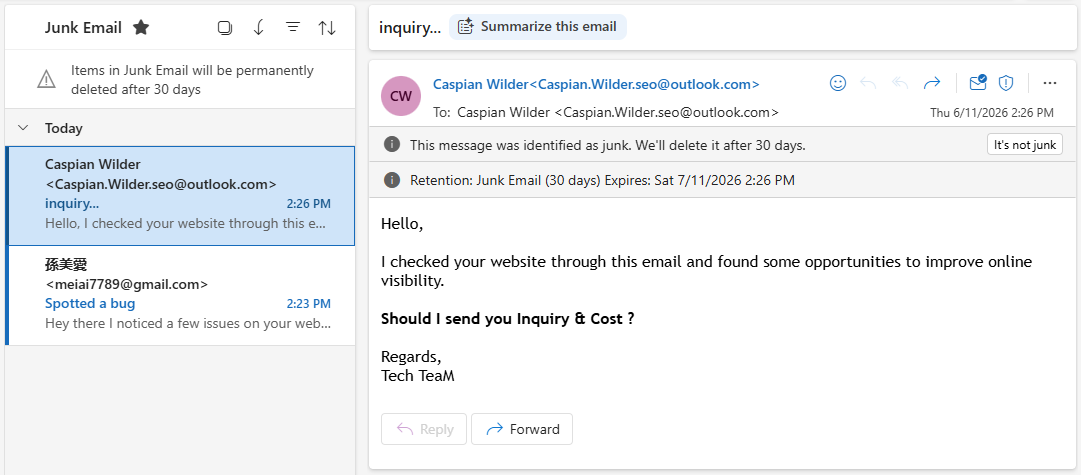
The sender claims:
“I checked your website through this email and found some opportunities to improve online visibility.”
That sentence immediately raises questions.
How does anyone check a website “through this email”? Moreover, which website did the sender inspect?
The message never says.
No Website Was Identified
A genuine website review should identify the website.
For example, the sender might mention a specific domain name. Additionally, the message might name one page with a problem.
This email does neither.
The sender could have mailed the same text to thousands of people. In fact, that probably happened.
No Actual Problem Was Explained
The sender claims to have found “some opportunities.”
However, no opportunities appear anywhere in the message.
There is no broken link, missing title, slow page, or security issue. Likewise, there is no search ranking, screenshot, or test result.
A real professional can explain at least one concern.
No Company Name Appears
The sender provides no recognizable company name.
The signature merely says “Tech TeaM.” Even that wording uses strange capitalization.
There is no business address. Furthermore, there is no telephone number or company website.
Legitimate businesses usually want prospects to verify who they are.
Scammers prefer shadows.
The Free Email Address Raises Questions
The sender uses an Outlook.com address.
A free email address does not automatically prove fraud. Many honest people use Gmail, Outlook, or Yahoo.
However, a supposed search engine specialist should understand professional branding. Therefore, a company domain would make more sense.
The free address becomes more suspicious beside every other warning sign.
The Sender Address Matches the Recipient
The message appears addressed from Caspian Wilder to Caspian Wilder.
That may result from poor mailing software or hidden recipients. Still, it suggests a bulk campaign rather than personal research.
A sender who truly reviewed my website should know my name. Additionally, that sender should know which company owns the website.
This message shows no such knowledge.
The Subject Says Almost Nothing
The subject line appears as “inquiry…”
That vague wording serves a purpose.
It creates curiosity without making a clear promise. Consequently, more recipients may open the message.
Scammers often rely on curiosity before they introduce urgency or fear.
The Grammar Looks Careless
The phrase “through this email” makes little sense.
The question “Should I send you Inquiry & Cost ?” also contains awkward wording. Additionally, it includes an unnecessary space before the question mark.
Poor grammar alone does not prove criminal intent. However, careless writing can reveal mass-produced outreach.
It also conflicts with the sender’s supposed professional expertise.
The Message Offers No Credibility
The email contains no customer references.
It provides no portfolio, company history, professional certification, or privacy information. Furthermore, it offers no way to confirm the sender’s identity.
Anyone can claim to be a website expert.
Evidence separates professionals from pretenders.
Why These Emails Reach So Many Businesses
Website ownership information remains easy to collect.
Automated programs can gather addresses from websites, directories, social media, and leaked databases. Then, bulk email systems send thousands of messages cheaply.
The sender only needs a few responses.
Even a terrible response rate can produce money at that scale.
The First Message May Only Test You
Sometimes, the first email does not request money.
Instead, it asks a harmless question. For example, it may ask permission to send a report.
That reply confirms several valuable facts.
First, your address works. Second, a person reads it. Finally, you respond to unsolicited offers.
You may then receive more aggressive messages.
Scammers Search for Potential Marks
Many scams begin with simple qualification.
The sender wants to know whether you control a business. Additionally, the sender wants to know whether you worry about online visibility.
A quick reply may place you on a more valuable contact list.
That list can then get sold repeatedly.
The “Free Audit” Often Leads Somewhere Else
A sender may promise a free website audit.
However, the report often contains generic warnings. Many warnings may apply to almost any website.
For example, the report may claim your website needs:
- Better search engine optimization
- More backlinks
- Faster loading
- Stronger security
- Improved mobile performance
- More traffic
- Better social media exposure
Those claims sound serious. Yet they mean very little without details.
The Report May Use Automated Results
Many supposed experts run free automated testing tools.
Then, they copy the output into a branded report. Consequently, the report can look impressive without requiring real expertise.
Automated tools can provide useful clues. However, they often need human interpretation.
A low score does not always indicate a real business problem.
Some Findings May Be Completely Invented
More dishonest senders simply fabricate problems.
They may claim your website has malware, broken search rankings, or serious security failures. Then, they offer an urgent repair service.
Fear can overpower careful thinking.
That emotional reaction creates the opening they need.
The Real Goal May Be Your Credit Card
Many suspicious solicitations eventually request card information.
The charge might begin as a small audit fee. Alternatively, the sender may offer a low-cost trial.
The amount may seem harmless.
However, the card number carries far more value than the first payment.
Small Charges Can Test a Stolen Card
Criminals sometimes make a small charge first.
That charge helps confirm whether the card remains active. Then, larger charges may follow.
In other cases, the criminal sells verified card information.
A tiny purchase can therefore become a serious warning.
Recurring Billing Creates Another Trap
Some questionable services hide monthly billing inside their terms.
The first payment may cost only a few dollars. However, later charges can reach hundreds.
Canceling may become difficult.
The company may ignore messages, change names, or disappear entirely.
The Service May Deliver Almost Nothing
Not every dishonest operator steals card numbers directly.
Some simply sell useless services.
They may provide meaningless reports, automated backlinks, or copied content. Consequently, the customer pays for activity without receiving real value.
The website may gain nothing.
Bad Search Engine Work Can Cause Harm
Poor search engine optimization can damage a website.
A careless provider may create spam links, duplicate pages, or keyword-filled nonsense. As a result, search engines may distrust the site.
Repairing that damage can take months.
Therefore, choosing the wrong provider can cost more than doing nothing.
They May Request Website Access
Some senders eventually request WordPress administrator access.
They may claim they need access to fix search problems. However, administrator access provides enormous control.
A dishonest person could add users, steal data, install malware, or redirect visitors.
Never provide access before verifying the provider.
Hosting Access Creates Greater Risk
A scammer may request hosting credentials, File Transfer Protocol access, or control-panel access.
Those credentials can expose every website file. Additionally, they may expose databases, email settings, and backups.
The attacker could destroy the site or hold it for ransom.
Website access should never become a casual transaction.
Remote Access Can End Even Worse
Some scammers ask to connect through remote desktop software.
They may use products such as AnyDesk or TeamViewer. Then, they can control the victim’s computer.
They may view passwords, banking sessions, email, and private files.
No stranger needs remote computer access to discuss a website audit.
A Fake Expert May Resell Cheap Labor
Some solicitations come from aggressive sales operations.
The salesperson may know almost nothing about websites. Instead, the company collects payment and outsources the work cheaply.
The customer receives poor communication and inconsistent results.
Meanwhile, the salesperson moves to the next victim.
Some Messages Are Lead-Generation Experiments
Not every sender plans immediate theft.
Some companies send enormous amounts of misleading email to generate sales leads. However, deception still creates the first contact.
They pretend to have reviewed a website when they have not.
That approach tells me everything about their business ethics.
Trust Should Begin Before the Sale
A trustworthy company does not need a false claim.
It can explain its services honestly. Additionally, it can identify its staff, location, website, and experience.
The company can provide references and answer questions.
Trust begins with the first sentence.
These Messages Hurt Legitimate Professionals
This flood of junk mail creates broad suspicion.
Business owners begin distrusting every web designer, host, consultant, and marketing company. Consequently, honest providers must overcome damage they did not cause.
That frustrates me deeply.
CharlesWorks has spent decades earning customer confidence one relationship at a time.
Experience Cannot Be Faked Forever
A real provider can discuss technical details clearly.
That provider can explain limitations, costs, risks, and realistic expectations. Moreover, the provider will admit when something does not need fixing.
Scammers usually avoid specifics.
Specific questions expose shallow knowledge quickly.
Ask Which Website They Reviewed
A simple response can test a website audit scam emails claim.
Ask for the exact website address they reviewed. Then, ask which pages they inspected.
A genuine reviewer should answer easily.
A bulk spammer may avoid the question or send another generic response.
Ask for Three Specific Findings
Request three exact problems.
Each finding should include the affected page and supporting evidence. Additionally, the sender should explain why the problem matters.
Words like “visibility,” “ranking,” and “optimization” are not findings.
They are marketing language.
Ask How They Found You
A legitimate provider should explain how they found your business.
Perhaps they saw a directory listing or received a referral. However, vague answers suggest automated address harvesting.
You deserve to know why someone contacted you.
Verify the Company Independently
Never use only the links provided inside an unsolicited email.
Instead, search for the company independently. Check its domain, address, history, and customer reviews.
Look for consistent information across multiple sources.
A convincing website alone does not prove legitimacy.
Check the Domain Name
A professional email domain should usually match the company website.
Also, inspect the spelling carefully. Scammers often register domains that resemble legitimate companies.
One changed letter can redirect you to an impostor.
Slow down before clicking.
Review the Website’s Age and History
A newly registered domain deserves added caution.
Of course, every legitimate company begins somewhere. However, a new domain conflicts with claims of decades of experience.
Likewise, an empty or unfinished website should raise questions.
Claims should match evidence.
Search the Exact Message Text
Copy one unusual sentence from the email.
Then, search for that sentence inside quotation marks. Often, identical messages appear in scam reports or online discussions.
Bulk templates leave fingerprints.
That quick search may reveal thousands of matching solicitations.
Never Send Payment During the First Contact
Do not provide card information because someone created urgency.
First, verify the business and review a written agreement. Additionally, understand every recurring charge and cancellation rule.
A reputable provider will allow reasonable time.
Pressure suggests trouble.
Use a Safer Payment Method
Credit cards generally provide stronger dispute options than wire transfers.
Virtual card numbers may offer additional protection. Furthermore, some banks allow transaction limits or one-time numbers.
Never pay strangers using cryptocurrency, gift cards, or wire transfers.
Those methods offer little recovery protection.
Protect Your Main Credit Card
Consider using a separate business card for online services.
Set a low limit when possible. Additionally, enable instant transaction alerts.
These steps cannot prevent every problem.
However, they can limit the damage and provide early warning.
Never Reuse Website Passwords
Every website account should use a unique password.
Use a reputable password manager to create and store strong credentials. Moreover, enable multi-factor authentication whenever possible.
One stolen password should not unlock several systems.
Password reuse turns one mistake into many problems.
Create Temporary Access When Necessary
Sometimes a real developer needs website access.
In that case, create a separate user account. Give only the permissions required.
Then, remove the account after the work ends.
Never share your own administrator password.
Keep Reliable Backups
Before allowing anyone to change a website, make a complete backup.
The backup should include files and the database. Additionally, store a copy away from the website server.
A backup provides a path home after a bad decision.
Without one, recovery may become expensive.
Watch for Fake Urgency
Scammers often claim immediate action is necessary.
They may warn that your website will disappear from Google. Alternatively, they may claim hackers already control it.
Real problems can require urgent action.
However, honest professionals can explain the evidence.
Watch for Guaranteed Rankings
No ethical provider can guarantee a specific Google ranking.
Search results depend on competition, location, content, authority, and many other factors. Additionally, search engines change constantly.
Guaranteed first-place rankings belong in the same drawer as magic beans.
Do not buy either.
Watch for Huge Promises
Suspicious providers may promise thousands of visitors quickly.
However, traffic alone means little. Visitors must have genuine interest in the business.
Bot traffic creates impressive numbers without creating customers.
Good marketing focuses on useful results.
Watch for Requests to Keep Secrets
A scammer may discourage you from contacting your current provider.
The person may claim your existing developer caused the problem. Consequently, fear and isolation make manipulation easier.
A second professional opinion protects you.
Honest experts do not fear verification.
Trust Your Existing Relationships
Business owners should contact people they already know.
Ask the current web provider whether the warning makes sense. Additionally, request supporting logs, reports, or screenshots.
A five-minute conversation may prevent a costly mistake.
Trusted relationships remain one of the strongest defenses.
Mark Clear Spam as Junk
Do not reply simply to insult the sender.
A reply confirms that a person monitors the address. Therefore, the address may become more valuable to other spammers.
Mark the message as junk or phishing.
Then, delete it.
Preserve Evidence After a Payment
Save the email, headers, receipts, reports, and chat messages.
Also, record every charge and cancellation attempt. This evidence may help your bank investigate the dispute.
Screenshots can disappear later.
Keep your own copies.
Contact the Card Issuer Quickly
Report suspicious charges immediately.
The card issuer may block further payments and replace the card. Additionally, the issuer may begin a dispute.
Delay can make recovery harder.
Fast action matters.
Change Credentials After Sharing Access
Change every shared password immediately.
Remove unfamiliar administrator accounts. Then, inspect plugins, themes, scheduled tasks, and website files.
Also, check email forwarding rules and hosting users.
An attacker may leave several ways back inside.
Scan the Website for Changes
Review recent file modifications and login activity.
Look for unknown plugins, scripts, users, and database changes. Additionally, check whether visitors get redirected elsewhere.
A clean-looking homepage does not prove a clean website.
Malware often hides from administrators.
Report the Message
You can report phishing through your email provider.
You may also report fraud to appropriate consumer protection agencies. However, avoid expecting every report to produce an immediate arrest.
Reports still create useful patterns.
Large investigations often begin with many small complaints.
Why People Still Fall for These Messages
Scammers sending website audit scam emails do not need every person to believe them.
They only need someone who feels worried, rushed, curious, or overwhelmed. Moreover, business owners already carry dozens of responsibilities.
A message about lost customers can hit a sensitive nerve.
That emotional timing creates vulnerability.
Intelligence Does Not Guarantee Protection
Smart and experienced people still get scammed.
Scammers study human behavior rather than intelligence. They exploit fear, authority, urgency, embarrassment, and hope.
Anyone can make a bad decision during a stressful moment.
Therefore, education matters more than blame.
The Best Defense Is a Pause
Stop before clicking, replying, paying, or sharing access.
Then, verify the claim through another source. Ask someone trustworthy to review the message.
That pause breaks the scammer’s rhythm.
A few quiet minutes can save thousands of dollars.
My Final View
The email shown here contains nearly every sign of worthless bulk outreach.
It identifies no website, company, problem, qualification, or verifiable service. Furthermore, its grammar and formatting reduce its credibility.
Perhaps the sender only wants to sell poor marketing services.
However, the message provides no reason to risk money, credentials, or trust.
Real Professionals Welcome Questions
Don’t rely on fake website audit scam emails. A real web professional should welcome careful questions.
That person should explain the work, provide evidence, and identify the company. Additionally, the provider should protect the customer’s access and payment information.
Trust should grow through transparency.
It should never begin with a vague email from “Tech TeaM.”